
The gap between a casual gaming corner and a true competitive environment isn’t just visual—it directly impacts your performance, reaction time, and long-term comfort. An unoptimized desk, outdated peripherals, or poor ergonomics can quietly hold you back and even cause physical strain during extended sessions. That’s why this pro gaming setup guide delivers a complete blueprint for transforming your space into a performance-driven battlestation. You’ll discover which components genuinely sharpen your competitive edge, how to design your setup for endurance and focus, and the precise optimizations that help you move from enthusiastic player to serious contender.
The Engine and the Window: Nailing Your PC and Monitor Specs
Focus on Stability Over Peak Power
In competitive games like Valorant and Apex Legends, consistent frame rates matter more than ultra graphics. A frame rate (measured in FPS, or frames per second) is how many images your PC renders each second. Higher and steadier FPS means smoother motion and clearer tracking.
Some players argue max settings help visibility. Sometimes true—but if your FPS fluctuates wildly, your aim suffers. A balanced CPU/GPU combo is key: think a modern 6–8 core CPU paired with a mid-to-high tier GPU. If one component is too weak, you get a bottleneck (when one part limits overall performance).
RAM and Storage for Zero Bottlenecks
16GB RAM is today’s gaming baseline. If you stream, multitask, or keep Chrome open (we all do), 32GB adds breathing room.
An NVMe SSD drastically reduces load times compared to older SATA drives. Faster storage won’t increase FPS directly, but it eliminates stutters from asset loading (and nobody likes spawning late).
The Monitor Is Your Competitive Advantage
Your monitor displays what your PC produces—this is the “window.” Look for:
- 144Hz minimum refresh rate (240Hz+ is pro standard)
- 1ms GTG response time (reduces motion blur)
- Adaptive Sync (G-Sync/FreeSync prevents screen tearing)
Refresh rate is how often the screen updates per second. Higher equals smoother motion.
Panel Technology Explained
- TN: Fastest, weaker colors
- IPS: Best color accuracy
- VA: Best contrast
For pure competitive play, TN or fast IPS wins. For gaming plus content creation, IPS is ideal. Follow a solid pro gaming setup guide, prioritize stability, and your aim will thank you.
Your Digital Weapons: Choosing a Mouse, Keyboard, and Headset
The Mouse – An Extension of Your Hand
First things first: if your mouse skips, nothing else matters. Sensor accuracy (how precisely your mouse tracks movement) and a flawless polling rate (how often it reports to your PC, measured in Hz) are non-negotiable. As one semi-pro FPS player told me, “If my crosshair jitters, I’m already dead.”
Now, some argue weight is overhyped. “Heavy mice feel more stable,” a friend once insisted. Fair. But in fast-paced shooters, lightweight mice reduce fatigue and improve flick speed (especially for low-sensitivity players). Shape matters just as much. Palm grip users need fuller support, claw grip players prefer raised backs, and fingertip users thrive on compact designs. Ignore this, and you’ll feel it in your wrist by round three.
The Keyboard – Speed and Space
Mechanical keyboards dominate for a reason. Unlike membrane boards, they use individual switches for faster, more consistent actuation (RTINGS, 2023). Linear switches offer smooth, uninterrupted presses—ideal for rapid double-taps. Tactile switches provide a bump for feedback. “I need to feel the key actuate,” one esports coach said. “Otherwise I second-guess my movement.”
Meanwhile, smaller layouts like TKL or 60% free up desk space. More room for your mouse equals cleaner aim arcs (simple geometry, really). Some say full-size is more practical—and sure, if you live in spreadsheets. But for competitive play, space wins.
The Mousepad – The Unsung Hero
Cloth pads prioritize control; hard pads prioritize speed. Low-DPI players especially need large surfaces for sweeping movements. Pro tip: if you’re running out of pad mid-fight, it’s too small.
Audio Cues Win Fights
Finally, audio. High-quality headsets enhance positional awareness (the ability to detect where sounds originate). Stereo often delivers more accurate imaging than virtual 7.1, which can muddy cues (PC Gamer, 2022). And don’t overlook your mic. Clear, noise-canceling communication wins rounds—because “He’s behind you!” only works if your team actually hears it.
For a complete breakdown, check any serious pro gaming setup guide and compare specs before buying.
Beyond the Screen: Mastering Your Physical Space for Peak Performance
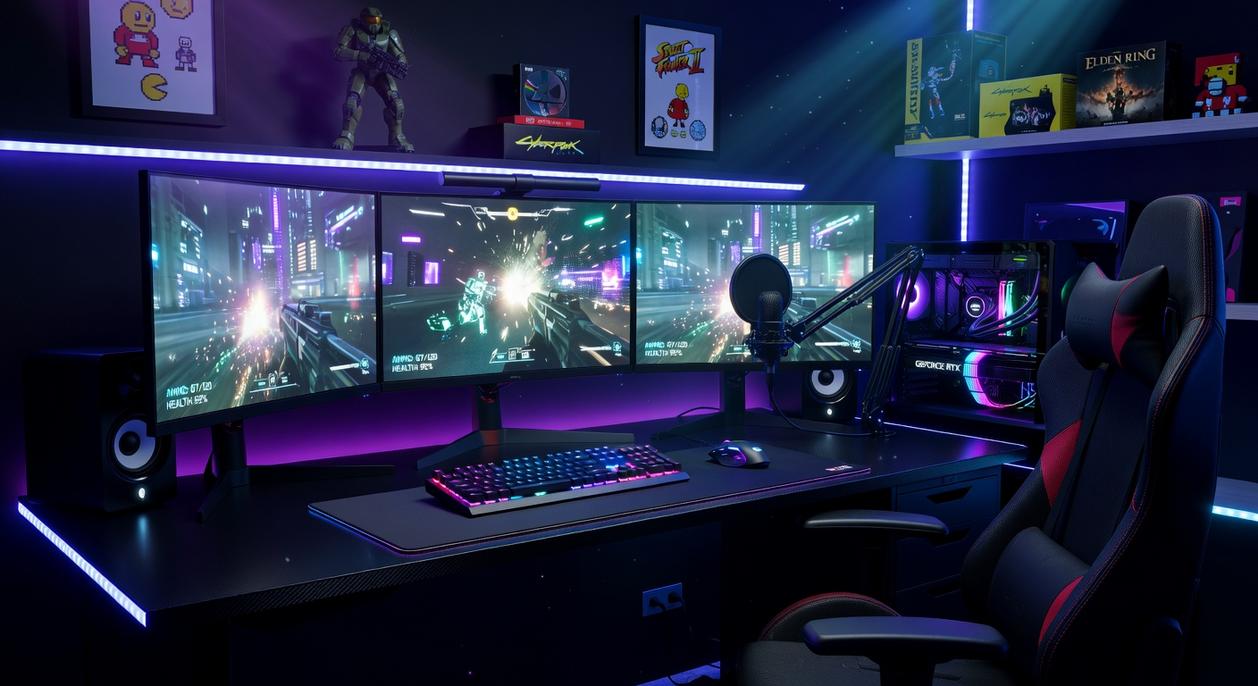
First, let’s clarify something: comfort is not a luxury in gaming—it’s a performance tool. Your throne, the ergonomic gaming chair, directly affects endurance. “Ergonomic” simply means designed to support your body’s natural posture. Look for adjustable lumbar support (lower-back cushioning you can move to fit your spine), 4D armrests (armrests adjustable up/down, forward/back, side-to-side, and angled), and breathable materials to prevent heat buildup. Think marathon, not sprint.
Next, the foundation—your desk. Stability means zero wobble during intense mouse flicks (yes, even in overtime). Depth should be at least 24–30 inches to maintain proper viewing distance and reduce eye strain. Width? Ideally 48–60 inches to allow wide, sweeping mouse movements without knocking over your water bottle (we’ve all done it).
Meanwhile, cable management isn’t just aesthetic. Clean routing prevents snags, simplifies cleaning, and reduces visual clutter—boosting focus. Use under-desk raceways and Velcro ties for easy adjustments.
Finally, control your lighting. Position lights to avoid screen glare. Add bias lighting—a soft light behind your monitor—to reduce contrast strain during long sessions. For display tweaks, see the best monitor settings for competitive gaming performance.
Consider this your pro gaming setup guide in action.
Tuning Your Rig: The Software Tweaks Pros Use
Optimizing Windows for Competitive Play
First, enable Windows Game Mode (Settings > Gaming) to prioritize system resources. Next, disable unnecessary startup programs in Task Manager—fewer background apps mean lower CPU spikes. Then switch your Power Plan to High Performance or Ultimate Performance to prevent clock speed throttling. Together, these tweaks reduce input lag and stabilize frame rates.
In NVIDIA Control Panel or AMD Adrenalin, set Power Management Mode to Prefer Maximum Performance and enable Low Latency Mode (or Anti-Lag). Finally, in-game, lower shadows, foliage, and post-processing. Frame rate and visibility win matches—ultra graphics don’t. For more, see our pro gaming setup guide.
Step Into Your Arena
You came here to build a battlestation that won’t hold you back—and now you have the full blueprint to make it happen. With the pro gaming setup guide, you’ve eliminated the biggest frustration competitive players face: being limited by their own hardware. No more lag spikes, no more discomfort, no more second-guessing your gear.
When every component is optimized for pure performance, your skill finally gets the spotlight it deserves. Consistency, comfort, and competitive edge all start with the right setup.
Don’t let one weak link cap your potential. Identify it. Upgrade it. Join the thousands of serious players already leveling up their performance—start refining your setup today and dominate tomorrow.