
If you’re searching for ways to level up your gaming performance, comfort, and overall setup, you’re in the right place. Whether you’re grinding ranked matches, exploring expansive RPG worlds, or fine-tuning your mods, having the right strategies and environment can make all the difference.
This article dives into the hottest gaming topics right now—from smart gameplay tactics and community-driven insights to pro-level setup advice that actually improves reaction time and endurance. We’ll also break down how to build the perfect ergonomic gaming desk setup so you can play longer without sacrificing comfort or health.
Our recommendations are based on hands-on testing, real community feedback, and analysis of what top players are actually using—not just what’s trending. If you want practical, proven insights that help you play smarter and set up like a pro, this guide is built to give you exactly that.
Beyond the RGB: Building a Workspace That Wins
I used to think more RGB meant better performance. My desk looked like a neon arcade, yet after two hours my wrists ached and my focus tanked. That was my wake-up call. Flashy gear is fun, but ergonomics—the science of designing for human efficiency—wins games.
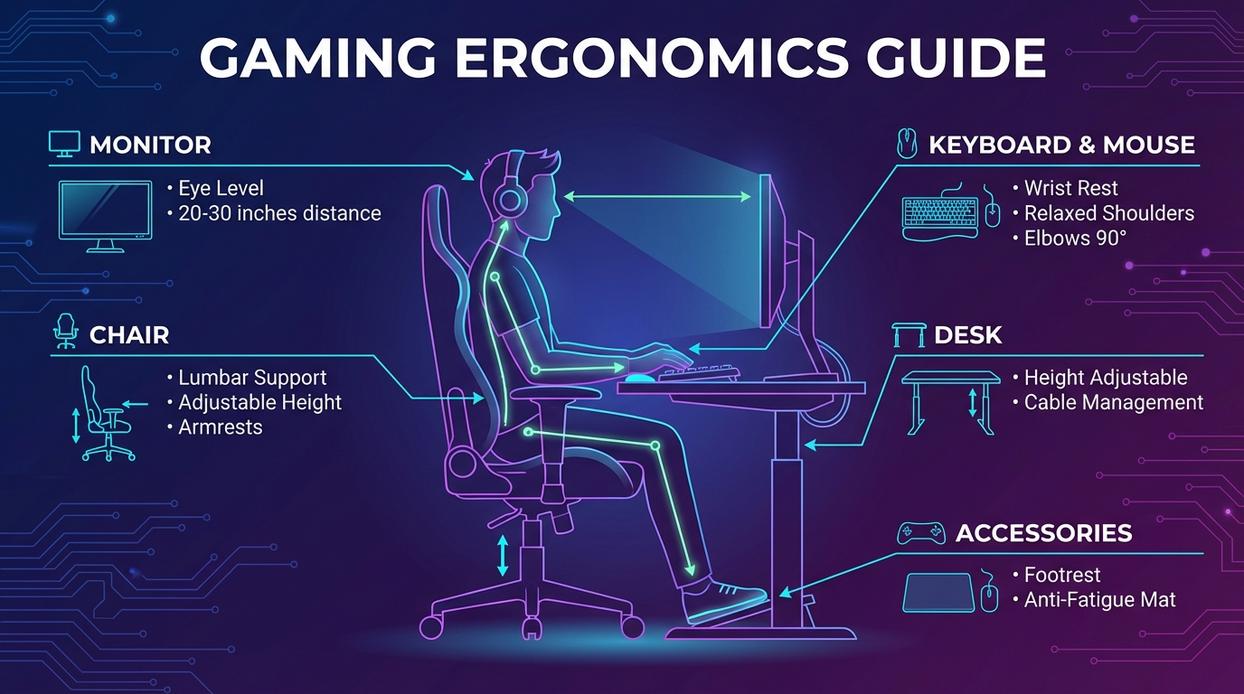
First, dial in chair height so elbows rest at 90 degrees. Next, raise your monitor to eye level to prevent “tech neck” (yes, it’s real). Finally, invest in an ergonomic gaming desk setup that supports neutral posture and smooth mouse travel.
In short, comfort compounds. And over long sessions, that edge matters.
The Foundation: Selecting Your Desk and Chair for Peak Performance
A powerful rig means nothing if your body taps out before your match does. The foundation of any ergonomic gaming desk setup starts with smart dimensions.
Desk Depth Over Width
Most people obsess over width. Depth matters more. A desk at least 30 inches (76 cm) deep allows proper monitor distance (about an arm’s length) and full forearm support. Too shallow? You’ll crane your neck forward (hello, tension headaches). Wider desks are nice—but depth protects posture.
Sit/Stand Desks: Built-In Stamina Boost
Alternating between sitting and standing can reduce lower back strain and improve circulation during long sessions (Mayo Clinic). Some argue standing desks are overrated. Fair—but the real benefit isn’t standing all day. It’s changing positions. Memory presets save time and keep transitions effortless (pro tip: set one slightly higher for high-focus moments).
The Ergonomic Throne
Look for adjustable lumbar support, 4D armrests (up/down, left/right, forward/back, pivot), and seat depth adjustment. Proper elbow alignment keeps wrists neutral—critical for precision aiming.
Material Matters
Wood feels warm and sturdy. Laminate offers durability and smoother mouse tracking. Avoid glossy finishes—they reflect light and create glare (and no one needs extra flash during a boss fight).
Visuals Mastered: Optimal Monitor Placement and Configuration
The Eye-Level Rule
The top of your primary monitor should sit at or slightly below eye level. This keeps your neck in a neutral position, reducing strain over long sessions (the kind that accidentally turn into “just one more match”). A simple test: sit upright, close your eyes, relax, then open them. Your gaze should naturally land near the top third of the screen. Some argue tilting the monitor higher “feels immersive.” Maybe. But long-term neck flexion is linked to musculoskeletal discomfort, according to OSHA ergonomic guidelines. Comfort beats vibes.
Monitor Arms vs. Stands
Yes, stock stands work. But a quality monitor arm transforms flexibility, desk space, and posture alignment. It’s the backbone of an ergonomic gaming desk setup. Critics say arms are overpriced metal sticks. Yet the adjustability—height, tilt, depth—means precise alignment that static stands rarely match. Pro tip: gas-spring arms make micro-adjustments effortless.
The Gamer’s Gaze
Viewing distance should be about an arm’s length away; larger 32-inch displays may need 24–36 inches, especially at 4K resolution (per general ergonomic display studies from Cornell University). Too close strains focus; too far hurts target acquisition.
Multi-Monitor Setups
Angle secondary monitors inward at 15–30 degrees. Keep your primary display centered. Discord shouldn’t wreck your posture.
Control Surface: Ergonomics for Your Keyboard, Mouse, and Audio
Ever finish a long session and notice your wrists or shoulders aching? That’s usually your setup talking back.
Keyboard Positioning starts with centering it to your body—not off to the left like an afterthought. Your wrists should stay in a neutral posture (straight, not bent up or down). Wrist rests can help during pauses, but leaning on them while typing may increase pressure on the carpal tunnel (Mayo Clinic). Think support, not crutch.
Mouse Grip and Sensitivity matter more than most players admit. Are you a wrist aimer or an arm aimer? Higher sensitivity favors wrist movement, but lower sensitivity encourages broader arm motion—which many esports pros prefer for precision. A large mousepad isn’t just aesthetic; it promotes smoother arm tracking and reduces repetitive wrist strain. (Yes, that XXL pad has a purpose.) For deeper tweaks, explore keyboard and mouse customization tips for esports players.
The 90-Degree Rule: elbows bent around 90 degrees, forearms parallel to the floor. This reduces shoulder load and keeps wrists aligned (OSHA ergonomic guidelines). Sound simple? It works.
Audio Without Clutter: A headphone hanger clears desk space instantly. Position speakers at ear level, forming a triangle with your head for proper stereo imaging. Clean space, clear sound.
Is your ergonomic gaming desk setup working for you—or against you?
The Final Polish: Lighting, Cable Management, and Workflow
Let’s start with lighting—because, honestly, most setups get this wrong. If you’re gaming in a dark room with a blazing monitor, your eyes are doing overtime. Bias lighting—a soft light placed behind your monitor—reduces contrast between the bright screen and dark surroundings, which can help reduce eye strain (the American Optometric Association supports minimizing harsh contrast to ease fatigue). In my experience, it’s one of the cheapest upgrades with the biggest comfort payoff.
Now, cable management. Some people think it’s purely aesthetic. I disagree. Tangled cables snag, collect dust, and make upgrades annoying. Using raceways (plastic channels that guide cables), sleeves (fabric tubes that bundle wires), and simple Velcro ties keeps everything accessible. Pro tip: label both ends before routing cables—you’ll thank yourself later.
Next, create zones. I like dividing my desk into a “play zone” (keyboard, mouse, controller) and a “utility zone” (chargers, notebook, mic controls). This keeps your ergonomic gaming desk setup focused and distraction-free.
Finally, try the Reach Test. Sit upright and see if you can access essentials without leaning. If not, adjust. Comfort isn’t optional—it’s performance.
Think of your gaming space as a race car cockpit: every lever, screen, and pedal positioned for split‑second control. When your monitor sits too low or your chair fights your posture, it’s like driving with the seat misaligned—you waste energy before the lap even begins. By refining your ergonomic gaming desk setup, you trade strain for stamina. In turn, longer sessions feel less like marathons and more like steady, focused sprints. Start small. Raise your monitor. Clear the clutter. Then build outward, piece by piece, until your setup works with you, not against you. Your body will thank you daily.
Level Up Your Setup and Your Game
You came here looking for a smarter way to upgrade your gaming space—and now you know exactly what it takes. From dialing in your monitor height to refining your lighting and cable management, every tweak brings you closer to a cleaner, more efficient, and more immersive battlestation.
If you’ve been dealing with back pain, wrist strain, cluttered desks, or inconsistent performance, you don’t have to settle for it anymore. A properly built ergonomic gaming desk setup isn’t just about aesthetics—it’s about comfort, endurance, and gaining a competitive edge during long sessions.
Now it’s your move.
Audit your current setup. Adjust what you can today. Upgrade what’s holding you back. And if you want proven strategies, pro-level setup breakdowns, and step-by-step optimization tips trusted by thousands of competitive players, dive deeper right now and start transforming your desk into a performance powerhouse.
Your grind deserves better. Take action and build the setup that plays as hard as you do.