
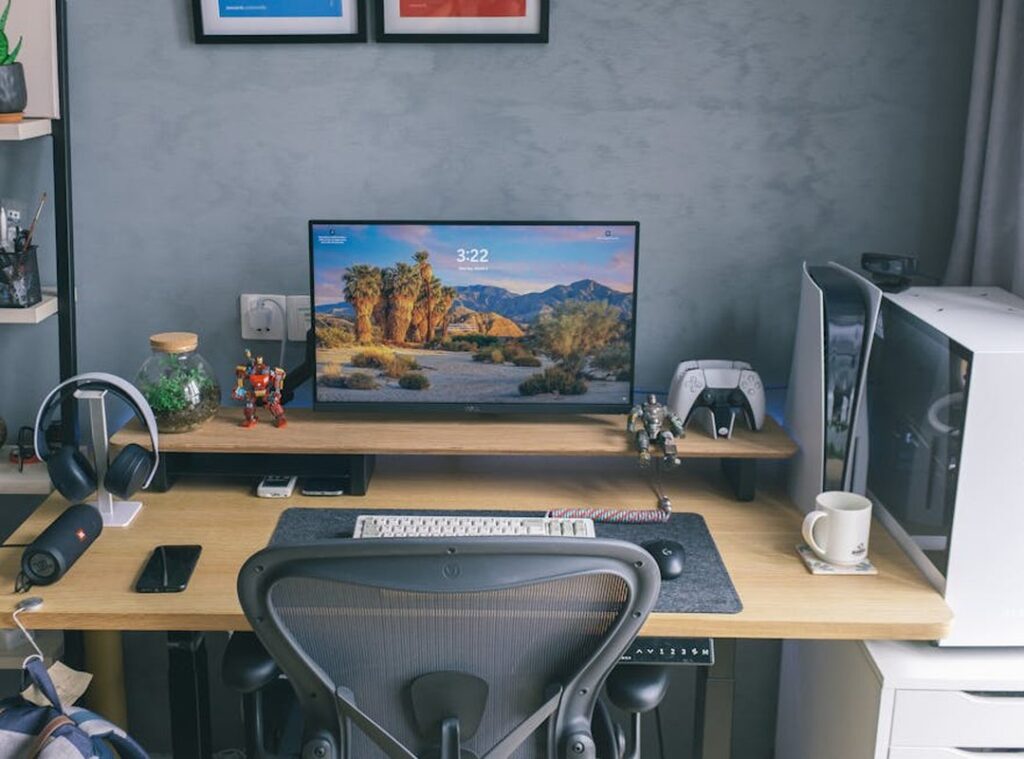
Spent thousands on top-tier components and still feel like your gaming setup is a mess? You’re not alone. Many of us sink cash into the latest gear, only to end up with a space that feels cluttered or off. our experience comes in.
We’ve lived with these setups, optimized for marathon sessions and competitive play, and we’re here to share our takeaways.
This guide is your ticket to transforming that pile of expensive parts into a cohesive, comfortable, and downright envy-inducing sanctuary. We focus on the combo between ergonomics, performance, and aesthetics (a must for any serious gamer).
By the end, you’ll have your ultimate gaming desk setup nailed. Trust us, your friends will drool over your battlestation. Ready to level up your gaming experience?
The Foundation: Nailing Ergonomics for Marathon Sessions
Ever had a gaming session cut short because your back felt like it was screaming at you? I have. It’s not about just having snazzy specs.
The real foundation of the ultimate gaming desk setup is all about health and comfort. Let’s get to it.
Your desk is the star of the show. Size matters (it really does). You need enough space for those wide mouse movements.
Ever tried cramming into a tiny desk? It feels like trying to game on an airplane tray table. The height of your desk is key too.
Adjustable ones let you find that sweet spot where your elbows are at 90 degrees. Trust me, your arms will thank you later.
And don’t get me started on the material. You want durability and a good feel. Nothing worse than a desk that feels like it’s about to cave in.
Now, chairs. Forget the overhyped “gaming chairs” for a second. You need something with adjustable lumbar support and 4D armrests.
Why? Because you want your forearms supported, and you want to avoid feeling like a pretzel after a long session. Seat depth adjustment is a game-changer too (pun intended).
What about that PC tower? On-desk placement makes it a showpiece and easily accessible. But under the desk might give you more space and less noise.
Though, keep airflow in mind. You don’t want it overheating just because you wanted a cleaner look.
Oh, and here’s a quick pro tip for you. Check out this important peripherals competitive gamers. It’s a goldmine for your setup.
Finally, here’s a simple ergonomic checklist:
- Desk height: elbows at 90 degrees
- Chair with lumbar support
- 4D adjustable armrests
- Adequate desk space for movement
- PC placement for airflow
Does your setup tick these boxes? If not, maybe it’s time for some adjustments.
Mastering Monitor Placement: Your Window to the Game
Let’s get right to it. The right monitor setup isn’t just about looking cool; it’s about feeling cool too. Imagine staring at a game for hours only to end up with a crick in your neck.
That’s just amateur hour. You need the ultimate gaming desk setup if you’re serious about immersion and comfort.
Let’s break it down. A single ultrawide monitor gives you that cinematic, wrap-around feel. It’s almost like being in the game, not just playing it.
But what about productivity? For getting work done and multitasking, dual horizontals are where it’s at. You can have your game on one screen and your chat or browser on the other.
Stacked monitors (one on top of another) are popular too. They save desk space, though let’s be honest, you gotta love a tall setup for that to work.
Now, for the golden rules of monitor placement: keep the top of your screen at or slightly below eye level and about an arm’s length away. This simple adjustment can drastically cut down on eye and neck fatigue. Why?
Because you’re not squinting or craning like a lost turtle.
And let’s talk monitor arms. These are non-negotiable. They free up desk space and let you adjust your monitors with ease.
Pair them with top-class height-adjustable gaming desks for a winning combo.
Finally, bias lighting. It’s a game-changer. By placing a soft light behind your monitor, you reduce eye strain during those late-night sessions.
Plus, it adds that extra bit of atmosphere (and who doesn’t want that?). Think of it as the cherry on top of your gaming sundae.
The Command Center: Strategic Peripheral & Audio Layout
Peripherals are your lifeline to the game. They’re not just tools; they’re extensions of you. Ever tried hitting a headshot with a misplaced mouse?

Yeah, it’s like trying to eat soup with a fork. The ultimate gaming desk setup demands precision. Your keyboard should be centered to your primary monitor.
It keeps your wrist straight, which is key. No one wants wrist pain halfway through a raid.
Now, let’s talk mouse sensitivity, or DPI. Your DPI setting affects how much space your mouse needs. High DPI?
You might need less space but more control. Low DPI? You’re gonna need a bigger desk.
It’s a balancing act. You want enough room to maneuver without knocking over your drink.
Audio is another beast. Headsets are immersive, pulling you into the game. But they can be uncomfortable for long sessions.
A good speaker system offers comfort, but maybe less immersion. For headset users, a desk-mounted stand keeps things tidy. (Pro tip: It also stops your cat from chewing the cord.)
Microphone placement is often overlooked. A dedicated boom arm positions your mic perfectly without clutter. It’s all about clear comms.
You don’t want your voice cutting off mid-sentence during a clutch moment. And if you’re setting up a gaming room, check out diy soundproofing home gaming rooms for the best sound experience. Trust me, it makes a difference.
The Final Polish: Flawless Cables & Immersive Lighting
You know that feeling when you’ve got your setup looking sharp, but something’s still missing? cable management and lighting swoop in to save the day. It’s not just about hiding cables; it’s about managing them. You want easy access and a clean look.
Zip ties are fine, but let’s get serious. Cable raceways that stick under your desk are a game-changer. No one wants to see spaghetti behind their screens.
Braided cable sleeves bundle those rogue wires into submission. Velcro ties? Perfect for stuff you swap out often.
Think of your ultimate gaming desk setup like a tailored suit. It’s all about the details. Aesthetic lighting is the cherry on top.
Don’t just slap RGB everywhere like a unicorn threw up. Sync your lighting with your peripherals. Match your in-game color palette.
Set a specific mood in the room. This isn’t just for show; it transforms your space into a sophisticated, custom-modded oasis.
Does it sound intense? Maybe. But the payoff is huge.
A refined setup makes everything feel more immersive. Imagine stepping into a room that screams “you” at every corner. It’s that premium feel you didn’t know you needed.
Trust me, once you’ve experienced it, there’s no going back. You’ll wonder how you ever gamed without it.
Transform Your Gaming Experience
You know the struggle. A messy gaming setup can ruin even the most solid rig. But there’s a fix.
A well-thought-out workstation is your ticket to unleashing the full potential of your gear. By focusing on ergonomics, strategic placement, and keeping it clean, you create a space that’s not just functional but a joy to use. Want to boost your performance?
Use this guide to start tweaking tonight. Test it with our game-specific plan guides. Transform your setup into the ultimate gaming desk setup.
Don’t wait. Dive in and experience the difference. Your gaming deserves nothing less.
 Neylith Windmere is the founder of The Hake Gamer, a specialized platform dedicated to the intersection of competitive excellence and technical creativity. By blending professional setup strategies with deep dives into hake-focused modding, Windmere has built a unique community hub that empowers players to master both their gameplay and their hardware. From tactical training to innovation spotlights, their leadership continues to shape the site into an essential resource for the modern, tech-savvy gamer.